PHP2Shell Part 2: The Emergency Patches Are Out! How Gemini 4 Argon & Wiz Found a Decade-Old Bug, and How to Patch Ubuntu, Debian & Google Cloud 🚀

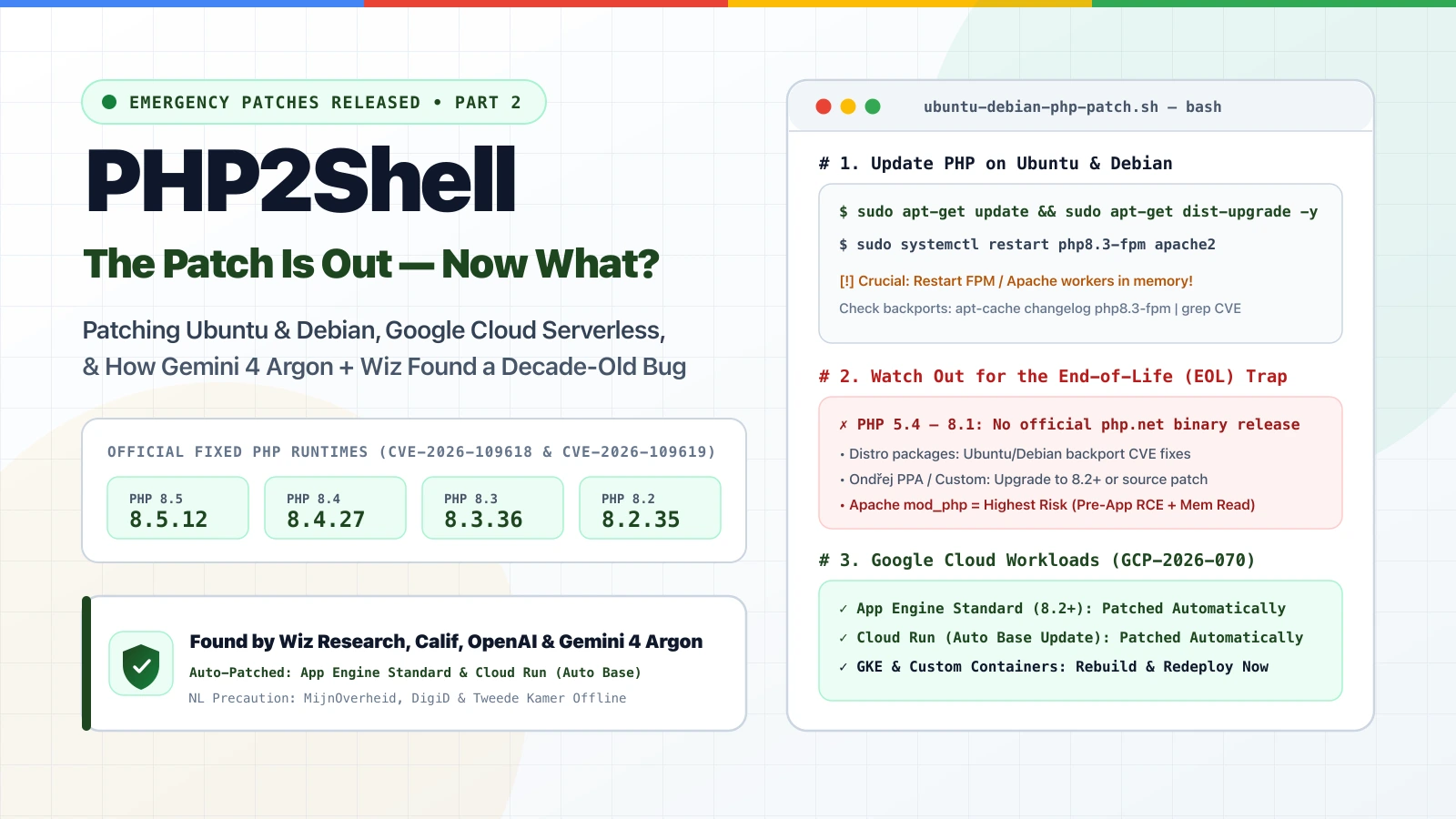
The wait is over: the PHP security team has officially released the emergency out-of-band patches for the two critical “PHP2Shell” vulnerabilities (CVE-2026-109618 and CVE-2026-109619, rated CVSS v4.0 9.2). Along with the patch came the full technical disclosure from Wiz Research, Calif, OpenAI, and Google—and it is a massive wake-up call for the entire industry. Let’s look at what actually sits under the hood of PHP2Shell, how frontier AI (including Google’s Gemini 4 Argon) turned a decade-old bug into a working exploit in days, whether you can just run apt-get update && apt-get dist-upgrade on your Ubuntu or Debian servers, and what is happening on Google Cloud.
(If you missed my first post earlier today covering the VirusTotal exposure window and our 5-step Google Cloud Armor edge mitigation ruleset, read Part 1: PHP2Shell — What Actually Protects You, What Doesn’t, and Mitigating at the Edge with Google Cloud Armor first!)
A True Turning Point: Heartbleed (2014), Log4Shell (2021), and Now PHP2Shell (2026)
Every few years, a vulnerability drops that forces the entire security community to rethink its assumptions. In 2014, Heartbleed showed us how fragile shared open-source infrastructure could be. In 2021, Log4Shell exposed how deeply buried software dependencies could put everything at risk.
PHP2Shell (CVE-2026-109618 and CVE-2026-109619) is that exact kind of moment for the AI era. Why? Because PHP powers roughly 70% of all websites in the world—including WordPress, Drupal, Joomla, and MediaWiki—and these flaws sit inside the core PHP engine itself, completely independent of the application code running on top of it. Even a one-line "Hello World" PHP script on a vulnerable runtime is exposed.
Here in the Netherlands, the precautionary response today showed just how seriously defenders took the threat: as reported by NOS and The Hacker News, MijnOverheid, DigiD, the Tweede Kamer (lower house of parliament), the National Cyber Security Centre (NCSC), and several Dutch educational platforms temporarily took systems offline as a precaution while waiting for the patch—alongside international SaaS platforms like BambooHR.
Inside the Research: 4 Memory-Safety Primitives & Pre-Auth Memory Bleed
Now that the embargo has lifted and Wiz Research published their full technical deep dive alongside the Google Cloud Security advisory, we finally know why core PHP maintainers warned earlier today that “ini settings won’t save you.”
All of the bugs stem from architectural decisions in how the PHP engine handles fatal out-of-memory (OOM) errors while processing a request. When an allocation failure interrupts PHP at the exact wrong moment, the engine destroys the request heap without clearing certain internal pointers. The worker process survives with stale, dangling pointers that get reused by the next HTTP request hitting that worker.
Wiz Research chained four distinct engine-level bugs across the two CVEs:
| CVE ID | Underlying PHP Engine Primitive | What an Attacker Can Achieve | Demonstrated By Wiz Research |
|---|---|---|---|
CVE-2026-109618 (GHSA-w8hw-w9fx-j79w) |
1. Remote process-memory disclosure (PS(id) dangling pointer)2. Upload-progress unserializer use-after-free ( BG(unserialize)) |
Unauthenticated disclosure of live PHP worker memory + memory corruption leading to RCE | Application-agnostic live memory leak + Pre-auth RCE on wordpress:latest, drupal:latest, and joomla:latest |
CVE-2026-109619 (GHSA-6wmf-4rv5-p3rp) |
3. Fatal-error backtrace use-after-free (EG(last_fatal_error_backtrace))4. OPcache shared-memory type confusion ( zend_accel_script_persist()) |
Cross-request use-after-free and cross-worker shared OPcache corruption leading to RCE | Pre-auth RCE on Drupal and WordPress |
Look closely at that first primitive under CVE-2026-109618: even without achieving Remote Code Execution, an unauthenticated attacker can read live memory from the PHP worker process. Because PHP parses RFC1867 multipart requests during request startup, an OOM abort leaves PS(id) pointing to freed memory, and a subsequent request URL-encodes reclaimed heap memory straight into a PHPSESSID response cookie—leaking passwords, API keys, bearer tokens, and TLS certificates from other users’ requests!
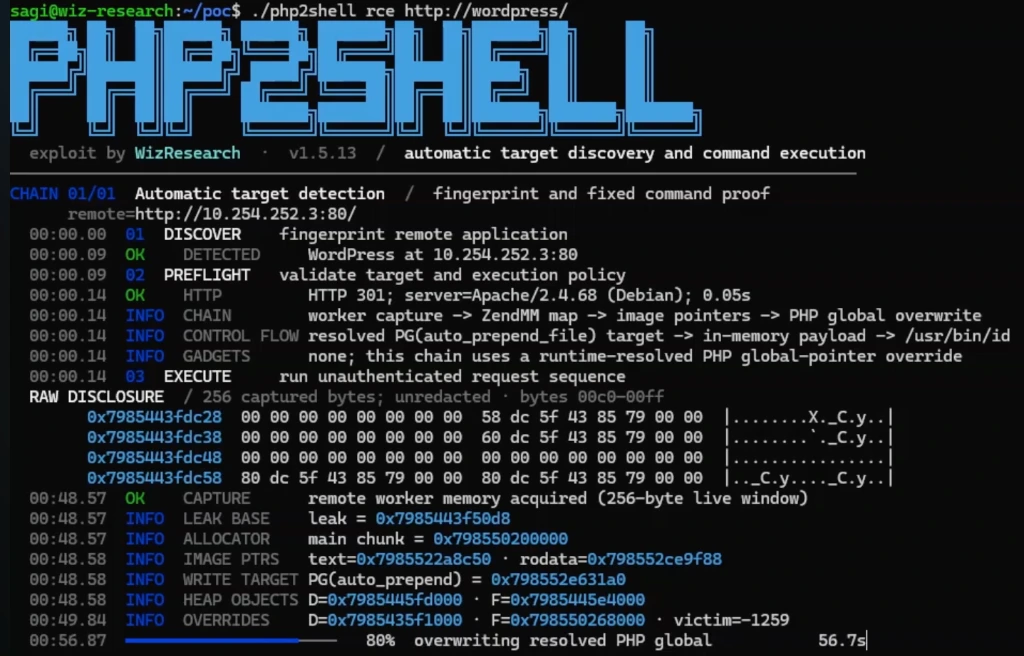
PG(auto_prepend_file) for unauthenticated RCE in 56.7 seconds (Source: Wiz Research)As you can see in the Wiz Research PoC terminal above (./php2shell rce http://wordpress/), the exploit captures a 256-byte window of live worker memory to resolve ZendMM heap and image pointers, then overwrites the PHP global PG(auto_prepend_file) with an in-memory payload—without needing a single application-specific gadget.
The official PHP advisory also confirms that Apache mod_php is at the highest risk, where an exploit triggers before a single line of application code runs, while PHP-FPM, php-cgi, FrankenPHP, and LiteSpeed are also affected across the two flaws.
The AI Inflection Point: How Gemini 4 Argon & Wiz Found a 12-Year-Old Bug
If these memory-safety bugs have been sitting in the PHP codebase since PHP 5.4 (over a decade ago, with roots tracing back to 2004), why weren’t they exploited years ago?
Because turning an OOM dangling pointer into a reliable, pre-auth RCE across different PHP versions, compilers, and memory layouts is brutally complex. Pre-AI, adapting a heap-grooming chain to a single target took a world-class exploit research team months of manual debugging.
In August 2026, Wiz Research (together with Calif and OpenAI) used Wiz Atlas, Google’s Gemini 4 Argon, and GPT-5.6 Sol to discover, chain, and validate the vulnerabilities. Both the Google Cloud and Wiz advisories highlight that Gemini 4 Argon made an invaluable contribution to finding the vulnerability, developing the exploit, building attack detections, and validating the upstream patch.
As Raluca Ada Popa (Head of Gemini Security at Google DeepMind) shared in the disclosure:
“Using Gemini 4 Argon, the team at Wiz has shown why frontier AI is a game-changer for cyber defense. For over a decade, these critical vulnerabilities remained unaddressed because vulnerability discovery and exploitation were incredibly complex. We’re pleased to see Gemini 4 Argon help defenders bridge that gap, finding vulnerabilities and helping patch them.”
With frontier AI models, a single researcher completed in one week what previously would have taken an entire team months—and adapted working exploits across WordPress, Drupal, and Joomla in hours. Complexity alone is no longer a security boundary.
How to Update PHP on Your Linux Server (Ubuntu & Debian)
Let’s get practical. The official fixes are out in PHP 8.5.12, 8.4.27, 8.3.36, and 8.2.35.
A question I immediately got from engineers running Linux VMs is:
“Jorge, we run Ubuntu / Debian on our servers. Can we just run
sudo apt-get update && sudo apt-get dist-upgradeand call it a day?”
The short answer is: Yes, apt-get update && apt-get dist-upgrade is the right command to pull the patched packages—BUT only if you understand three critical gotchas!
Gotcha 1: How Was PHP Installed on Your Ubuntu/Debian Box?
Before you run apt-get, check where your PHP packages actually come from:
- Scenario A — Official Ubuntu/Debian OS Repositories (Supported LTS): Ubuntu (22.04 LTS runs PHP 8.1, 24.04 LTS runs PHP 8.3) and Debian (Debian 12 Bookworm runs PHP 8.2, Debian 11 Bullseye LTS runs PHP 7.4) received the patches in advance. Instead of bumping your PHP version to
8.3.36or8.2.35, Ubuntu and Debian backport the security patch into the version number you already have (for example,8.3.6-0ubuntu0.24.04.xor8.2.26-1~deb12u1). - Scenario B — Ondřej Surý’s Repository (
ppa:ondrej/phporpackages.sury.org): Many production Linux servers use Ondřej’s repo to run PHP 8.2, 8.3, 8.4, or 8.5. Runningapt-get update && apt-get dist-upgradehere will pull the full upstream point releases (8.2.35,8.3.36,8.4.27,8.5.12) for supported branches. However, if you installed an End-of-Life branch like PHP 7.4, 8.0, or 8.1 from a third-party repo that doesn’t ship backports,apt-get dist-upgradewill not give you a fix unless the maintainer compiles the official PHP source backport branches (which PHP published for7.4,8.0, and8.1) or you upgrade to PHP8.2+.
Gotcha 2: apt-get dist-upgrade Does NOT Always Restart Running Worker Pools!
Updating the package on disk means nothing if your long-running php-fpm or apache2 worker processes are still running the old unpatched binary in RAM.
Here is the exact 4-step checklist to patch and verify your Ubuntu or Debian server safely:
# Step 1: Update package lists and install security upgrades
sudo apt-get update && sudo apt-get dist-upgrade -y

# Step 2: Verify the CVE is explicitly listed in the installed package changelog!
# (Never rely on 'php -v' alone on Ubuntu/Debian due to backporting)
apt-cache changelog php8.3-fpm | grep -E "CVE-2026-109618|CVE-2026-109619"

# Step 3: Explicitly restart your web-serving PHP runtime and web server!
# Adjust for your PHP version (php8.2-fpm, php8.3-fpm, php8.4-fpm, php8.5-fpm)
sudo systemctl restart php8.3-fpm
sudo systemctl restart apache2 || sudo systemctl restart nginx

# Step 4: Check that no old deleted PHP binaries are still held open in RAM
sudo lsof -nP +L1 | grep -i php
Gotcha 3: Check memory_limit After Patching
The upstream PHP patch introduces a new hard memory limit inside the engine to stop OOM state corruption at its root. Reaching this hard limit immediately terminates the worker process and skips shutdown handlers. After you patch, review your memory_limit and post_max_size in php.ini to make sure legitimate heavy requests in your app have enough headroom.
(And if you truly cannot patch a legacy server today: set memory_limit = -1 so scripts cannot override it, keep post_max_size small, never use OS-level RLIMIT_AS or RLIMIT_DATA as a substitute because PHP warns they trigger the exact same vulnerable code path, set session.upload_progress.enabled = 0, and on PHP 8.5 set fatal_error_backtraces = 0.)
What About Your Workloads on Google Cloud? (GCP-2026-070)
If you run PHP on Google Cloud, check the official guidance in security bulletin GCP-2026-070:
- App Engine Standard Environment (PHP 8.2+): Patched automatically by Google Cloud. No action required (unless you are still on EOL PHP 8.1 or older—upgrade to 8.2+ and redeploy).
- Cloud Run & Cloud Run Functions (PHP 8.2+): If you use automatic base image updates, Google Cloud updates your runtime automatically. If automatic base image updates are disabled—or you build your own custom
Dockerfile—rebuild your container image with PHP8.2.35+/8.3.36+/8.4.27+/8.5.12+and redeploy now. - Google Kubernetes Engine (GKE) & App Engine Flexible: Rebuild your container images or redeploy your services using the patched PHP runtime and roll out new pods.
- Scan & Monitor with SCC and Wiz: Use Artifact Analysis (or the On-Demand Scanning API) in Google Cloud to find vulnerable container images in Artifact Registry, enable Security Command Center (SCC) Container Threat Detection for GKE and Cloud Run, and use the Wiz Threat Intel Center advisory for PHP2Shell (including the Wiz Sensor
1.0.12768+runtime response policy) to detect and terminate any process exhibiting PHP2Shell exploitation behavior.
Hunting for Early Exploitation Attempts
Before the patch landed at 14:00 UTC, edge providers noted early scanning and probing attempts in the wild, though watchTowr and CISA had not recorded confirmed breaches at release time.
If you want to verify that nobody probed your servers before your patch went live, check your logs right now for the three forensic indicators highlighted by Wiz Research:
- Unusual
multipart/form-datarequests immediately followed by PHP memory-limit errors or bursts of HTTP500responses. - Abnormally large or malformed
PHPSESSIDresponse cookies (a telltale sign of theCVE-2026-109618worker memory disclosure leak). - Unexplained PHP worker churn or restarts in your
php-fpmor Apache error logs.
Keep your Google Cloud Armor perimeter rules from Part 1 active at the edge for defense-in-depth, patch your PHP runtimes across VMs and containers, and if you want to discuss how to automate this visibility with Google Cloud Security and Wiz, connect with me on LinkedIn or via my contact page!
VAMOS, happy patching! 🛡️🚀

Jorge Liauw Calo
Security Engineer at Google Cloud (Google Cybershield) with 13+ years of experience in Cybersecurity across highly regulated industries including Semiconductor, Banking, Fintech, and Insurance. Active member of the Google Cloud Community BeNeLux and Google Cloud Security Community Amsterdam.